



Introduction
Recording great audio is one thing. Turning that recording into something people actually want to listen to? That’s another job entirely. There are awkward pauses to remove. Sentences that need rescuing. Background noise that showed up uninvited. And sometimes, a perfectly good recording needs so much editing that the production process takes longer than creating the content itself.
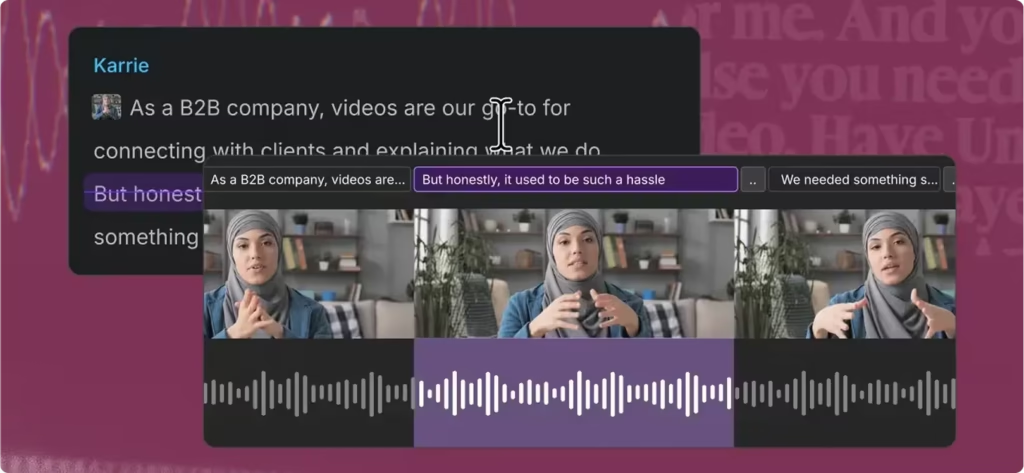
That’s the problem Descript set out to solve. Instead of asking creators to work exclusively with waveforms and complicated editing controls, Descript lets them edit audio and video through text. Remove a sentence from the transcript, and the corresponding recording changes with it. Need cleaner speech, a corrected voiceover, or a soundtrack? Its AI-powered tools can help with those tasks, too.
For podcasters, educators, voiceover artists, and video producers, it’s an appealing proposition. But there’s a bigger question worth asking: How good is Descript when you compare it with AI tools built specifically for songs, music, audio, and voice? Because making a podcast easier to edit and creating an original song from scratch are two very different challenges.
Descript’s story began in 2017, when Andrew Mason, the former Groupon co-founder, developed the company as a spin-off from his audio-tour business, Detour. Its original focus was straightforward but ambitious: make editing recorded audio feel more like editing a document. Contemporary launch reporting captured that early direction.
Then came an important turning point. In 2019, Descript acquired Lyrebird, a Canadian company specializing in AI voice technology. The acquisition, covered in contemporary industry reporting, helped expand Descript beyond transcription and editing into synthetic speech and voice correction. Today, Descript offers a much broader production environment.
As of our October 8, 2026 review, its official pricing website stated that more than six million creators and teams use the platform. That’s a company-reported adoption figure, not an independently audited count of paying subscribers. We couldn’t establish a reliable, current total for paid customers or subscriptions from the available public evidence.
So where does our assessment come from? At Find Premium AI, we’ve researched these tools over multiple years. Our 15-person team experimented with different models, features, and capabilities at different times, across a variety of tasks involving songs, music, audio, and voice. We also explored the available pricing plans to understand which subscriptions made sense for different production needs.
On October 6, 2026, we finalized our six-company comparison using seven weighted evaluation factors. For this article, we’ve brought together those hands-on findings, our public-review research collected through that cutoff, independent editorial assessments, and product information checked separately on October 8, 2026. The picture that emerges is interesting. Descript has genuine strengths. But its best qualities aren’t necessarily the ones that make an AI music generator great. Understanding that difference is the key to knowing whether it’s worth your money.
Performance
Descript’s biggest selling point isn’t that it can generate audio. It’s that it gives creators a simpler way to work with audio they’ve already recorded. Imagine finishing a long podcast interview. The conversation is good, but the recording needs attention. There are repeated phrases, uncomfortable silences, verbal mistakes, and background sounds that don’t belong in the finished episode.
Traditionally, you’d spend a substantial part of the editing process moving around a waveform, finding individual mistakes, making cuts, and listening carefully to every transition. Descript gives you another way to approach the job. It transcribes the recording so you can work directly with the words. Delete an unwanted sentence, and the associated media can be removed. Rearrange the conversation, clean up speech, and make further adjustments without treating every edit as a separate technical operation.
That’s a meaningful advantage for people who work with spoken content every day. Descript also supports multitrack editing. You can combine recorded dialogue, background music, sound effects, and other audio elements within the same project. And when a text-based edit isn’t precise enough, the timeline remains available. That flexibility matters.
Text editing makes audio production more approachable. It doesn’t make every audio problem disappear. A transcript can’t tell you everything about a speaker’s emotion, microphone quality, overlapping dialogue, musical balance, or the subtle timing that makes a recording feel natural. Those details still need human attention.
Descript’s AI Technology and Latest Capabilities
There’s an important distinction to make before discussing Descript’s AI capabilities. Descript isn’t one AI model. It’s a software platform that brings multiple AI-powered technologies into a shared production workflow. Those technologies support transcription, editing, speech enhancement, voice generation, recorded-speech repair, translation, dubbing, and generative media tasks.
One of the main ways users interact with them is through Underlord, Descript’s AI co-editor. Rather than manually working through every available feature, users can describe certain editing and production tasks in natural language. Underlord helps turn those instructions into actions within the project. But not every action relies on the same underlying technology. Different tools can use different models, with feature availability and AI-credit consumption varying accordingly.
That’s worth remembering whenever a platform advertises its latest AI improvements. For example, Descript’s March 17, 2026 release announcement described an updated underlying AI model for Regenerate, its speech-repair feature. The goal was better preservation of natural intonation and pacing when replacing words or phrases in a recording.
In practical terms, Regenerate is designed to make small spoken corrections less disruptive. Instead of rerecording an entire passage because of one mistake, a creator may be able to repair the relevant section. Descript didn’t publicly identify that underlying Regenerate model by a specific version name in the announcement. So we wouldn’t describe it as a newly verified, standalone Descript foundation model. The updates didn’t stop there.
On August 5, 2026, Descript’s feature announcement introduced Rev AI v3 as an available transcription-engine option and expanded the selection of models used for other AI-related tasks. Then, on September 17, 2026, the company released capabilities especially relevant to our Songs, Music, Audio & Voice evaluation. According to its product update, users could generate background music and sound effects from text prompts.
Describe the sound you need, specify the duration, and place the resulting audio into your project. The feature requires Descript version 145.0.15 or newer. The same release added a way to replace recorded audio with an AI-generated voice while keeping the original script. Descript also expanded its voice selection through the ElevenLabs voice library. For supported ElevenLabs V3 speakers, the update introduced tone instructions that can influence emotional delivery, pauses, and vocal expression.
That’s a useful combination for narration-heavy production. A creator can refine a script, repair spoken mistakes, choose an AI voice, generate supporting audio, and work toward a finished project without constantly switching between applications. Still, the underlying technology matters. Descript’s integration of ElevenLabs voices doesn’t mean that every Descript function runs on ElevenLabs. Nor does adding AI-generated background music make Descript equivalent to a dedicated song-composition platform.
Which brings us to the most useful question of all: What kind of audio are you trying to create?
How Descript Performs Across Audio and Music Tasks
Recorded speech and podcasts. This is where Descript makes its strongest case. The software is designed around the realities of spoken-word editing: transcripts, repeated phrases, unwanted pauses, recording mistakes, and the need to make long conversations flow naturally. Its filler-word removal tools can help clean up conversational speech. Studio Sound is designed to improve recording clarity and reduce unwanted background noise. And transcript editing gives creators a more accessible way to reshape their content.
For someone producing interviews, educational recordings, or recurring podcast episodes, those are practical advantages. But there’s a catch. Automatic transcription isn’t perfect. It may still require proofreading. And removing too many pauses or aggressively cleaning a recording can affect the rhythm of natural conversation. The tools can reduce editing work. They don’t eliminate the need to listen.
Voice generation and cloning. Descript also supports AI-generated speech, custom voice cloning, and regeneration of selected spoken sections. These capabilities can be helpful when a narrator makes a mistake, a passage needs replacing, or a new voiceover must be created from written material. The expanded voice library gives users more options for choosing a suitable delivery. But realistic voice generation involves more than making words intelligible.
The pacing has to fit. The emotion needs to make sense. The pronunciation must be right. And if generated speech is inserted into an existing recording, it needs to sound consistent with the surrounding material. That’s why we recommend listening carefully to the final output rather than assuming a generated correction is automatically ready to publish.
Descript’s regeneration documentation also identifies specific limits. Regenerate currently supports English audio and video, and individual actions are limited to 250 characters. Other restrictions involve edit boundaries and the surrounding recording. That distinction matters for multilingual projects. Support for transcription or translation across multiple languages doesn’t necessarily mean that every speech-repair feature offers the same language coverage.
Voice cloning adds another responsibility: consent. A convincing synthetic voice isn’t automatically a voice you have permission to use. Descript documents consent safeguards for certain voice and likeness modifications, and creators should ensure they have appropriate authorization before publishing generated or altered material.
Audio enhancement and production. Descript combines speech cleanup, multitrack editing, timeline controls, background audio, and export tools in a single environment. That’s useful when the goal is to assemble a finished podcast, narrated advertisement, voiceover, or dialogue-heavy video. But convenience and specialist-level control aren’t the same thing. A project requiring intricate musical mixing, advanced mastering, detailed automation, or highly technical sound design may still call for dedicated production software.
Descript’s advantage is bringing several related tasks together. It doesn’t need to replace every specialist application to be useful. Background music and sound effects Descript became more interesting for music-related production with its September 2026 update. Prompt-generated background music and sound effects let creators produce supporting audio inside an existing project. Think of a video editor who needs a short instrumental background or a sound effect that fits a particular scene.
Instead of leaving the editing environment to search for another asset, the creator can request an appropriate sound and place it on the timeline. That’s valuable. But we should be precise about what it means. Generating a musical background isn’t the same as composing a complete song with a verse, chorus, vocal melody, expressive singing, arrangement changes, and repeated artistic revisions.
They’re different production problems. Original songs and music composition. For complete song creation, Descript has a weaker purchasing case. Specialist music-generation products focus directly on composition, vocal performance, arrangement, musical structure, and the ability to develop or revise songs. Descript can work with musical material and now generate certain supporting audio elements. But its documented feature set doesn’t establish it as a comprehensive replacement for dedicated AI song-composition tools. If your primary goal is producing original vocal songs, that difference should influence your buying decision from the beginning.
What Independent Evaluations Suggest
It’s useful to compare our observations with what other researchers have assessed. In its March 27, 2025 independent evaluation, Zapier selected Descript for transcript-based audio and video editing after testing transcription applications. The assessment highlighted the approachable editing experience, Studio Sound, and AI-assisted production tools. It also found limitations.
Punctuation sometimes required manual correction, and longer synthetic-speech replacements could produce noticeable differences in tone. Those aren’t trivial concerns if you’re trying to create a polished recording. However, the scope of that evaluation matters. Zapier was examining transcription and editing applications, not conducting a controlled comparison of AI song-generation systems.
Its pricing observations also preceded Descript’s current credit-based subscription structure. So the evaluation provides useful support for Descript’s editing strengths. It doesn’t prove that Descript performs equally well at original music generation. That’s the broader lesson from the available evidence. Descript can make many production tasks easier. But it still benefits from proofreading, careful listening, and when the task demands it specialist tools.
Our Seven-Factor Evaluation Framework
We wanted our comparison to reflect more than impressive demonstrations or long feature lists. Over multiple years, our 15-person team experimented with different available models, tools, and subscriptions across a range of Songs, Music, Audio & Voice tasks. We then consolidated that research into a seven-factor framework, finalizing our six-company evaluation on October 6, 2026.
Each factor measures a different part of the experience.
| Evaluation Factor | What It Measures | Weight |
|---|---|---|
| AI Intelligence | Understanding creative intent, interpreting musical and audio references, developing original ideas, choosing suitable vocal expression, and responding intelligently to revisions | 15% |
| Speed | Time and consistency from request to usable songs, instrumentals, audio, or speech including generation, revisions, retries, and exports; response latency for real-time voice | 10% |
| Music, Audio & Voice Quality | Songs and music: melody, harmony, rhythm, arrangement, structure, lyrical quality, and natural singing. Audio: clarity, sound realism, production quality, and freedom from noise or artifacts. Voice: intelligibility, naturalness, pronunciation, pacing, intonation, emotional expression, and speaker consistency | 25% |
| Prompt Accuracy | Adherence to requested genre, mood, tempo, instruments, lyrics or script, language, accent, pronunciation, vocal style, emotion, duration, timing, and exclusions | 20% |
| User Rating | Public satisfaction from credible, product-specific reviews, prioritizing people who actually use the relevant song, music, audio, or voice features | 10% |
| Review Confidence | Authenticity, volume, recency, relevance, diversity of independent review sources, and whether reviews match the evaluated features and current product or model | 5% |
| Features & Usability | Lyric and script controls, section editing, track extension, stems, audio editing, voice libraries, voice cloning and conversion, pronunciation controls, dubbing, export quality, integrations, workflow, learning curve, pricing value, and clarity of commercial-use terms | 15% |
Two factors deserve particular attention. Music, Audio & Voice Quality and Prompt Accuracy account for 45% of our evaluation. That’s intentional. A tool shouldn’t rank highly merely because it offers dozens of features. The quality of what it produces and how closely that output matches the instructions matters enormously. Our scorecard presents factor results to one decimal place and overall scores to two decimals. Because it doesn’t separately specify an explicit denominator, we retain the original numerical presentation without assigning an undocumented scale.
And one more distinction is important. These scores represent our team’s comparative editorial judgments, informed by hands-on research. They’re not certified industry rankings. Different tasks, researchers, product versions, and priorities could reasonably lead someone else to a different ordering. Our goal is to make the reasoning useful enough that readers can reach a purchasing decision suited to their own work.
Comparisons Before You Buy
Descript earned an overall score of 6.99, placing fourth among the six AI products in our evaluation finalized on October 6, 2026. Fourth place might sound unremarkable. But the overall number doesn’t tell the most interesting part of the story. Descript performed very well in Features & Usability, yet its results were noticeably weaker in several areas related to generation quality, creative interpretation, and prompt adherence.
That contrast helps explain both its appeal and its limitations. Here’s how the six products finished.
| Product | Overall Score | AI Intelligence | Speed | Music, Audio & Voice Quality | Prompt Accuracy | User Rating | Review Confidence | Features & Usability | Best For |
|---|---|---|---|---|---|---|---|---|---|
| ElevenLabs | 8.58 | 8.9 | 8.6 | 8.5 | 8.6 | 7.6 | 7.0 | 9.5 | Projects combining narration, songs, sound effects and voice production |
| Suno | 8.14 | 8.4 | 8.3 | 8.6 | 8.0 | 6.5 | 6.5 | 8.8 | Complete vocal songs and substantial music-production revisions |
| Mureka AI | 7.65 | 7.8 | 8.0 | 7.9 | 7.5 | 6.0 | 6.0 | 8.7 | Song drafts developed with references, remixing, stems and production exports |
| Descript | 6.99 | 6.6 | 6.5 | 6.6 | 6.5 | 7.2 | 6.5 | 9.0 | Podcasts, recorded dialogue, narration and editing audio inside a project |
| Adobe Firefly | 6.82 | 6.5 | 6.8 | 6.3 | 6.3 | 8.8* | 4.0 | 8.3 | Video soundtracks, instrumental backing, voiceovers and sound effects |
| MiniMax Audio | 6.07 | 6.0 | 6.5 | 6.1 | 6.1 | 5.0† | 3.0 | 7.5 | Speech, voice cloning and music experiments with web/API options |
Source: Find Premium AI’s hands-on seven-factor evaluation, finalized October 6, 2026.
* Adobe Firefly, 8.8/10: Based on one G2 rating for the overall Firefly product. It does not specifically measure its music, audio or voice features. † MiniMax Audio, 5.0/10: A neutral placeholder because a reliable, comparable customer-rating average was not verified. It is not an actual customer rating.
Let’s look beyond the overall ranking.
AI Intelligence: 6.6
Descript scored 6.6 for AI Intelligence. ElevenLabs led the group with 8.9, followed by Suno at 8.4 and Mureka AI at 7.8. Adobe Firefly scored 6.5, and MiniMax Audio received 6.0. Descript therefore finished behind the three leading products but slightly ahead of Firefly and MiniMax. What does that mean for buyers? Descript offers useful AI assistance within its editing environment.
But across the broader tasks in our evaluation including creative interpretation, musical references, original ideas, vocal expression, and intelligent revisions it didn’t match the strongest competitors. If your work requires substantial creative generation, that gap deserves attention.
Speed: 6.5
Descript received 6.5 for Speed. ElevenLabs scored 8.6, Suno 8.3, Mureka AI 8.0, and Adobe Firefly 6.8. MiniMax Audio also scored 6.5. This result might seem surprising for software built around making editing easier. But our Speed evaluation wasn’t limited to how quickly someone could delete an unwanted sentence. We considered the journey from a request to a usable result, including generation, revisions, retries, and exports. A convenient editing interface doesn’t guarantee the fastest overall production process across every kind of music and voice task. That’s the distinction our score reflects.
Music, Audio & Voice Quality: 6.6
This is one of Descript’s most consequential results. Quality carries 25% of our evaluation the highest weight of any factor. Suno finished first in this category with 8.6. ElevenLabs followed closely at 8.5, with Mureka AI at 7.9. Descript scored 6.6, ahead of Adobe Firefly at 6.3 and MiniMax Audio at 6.1. The difference matters because our assessment includes much more than clean speech.
We evaluated musical structure, melody, harmony, rhythm, arrangement, lyrics, singing, audio realism, production quality, speech characteristics, and unwanted artifacts. Descript’s strengths in editing recorded material don’t automatically translate into stronger results across all those requirements. For buyers primarily interested in original music, the leaders’ higher quality scores are especially relevant.
Prompt Accuracy: 6.5
Descript also scored 6.5 for Prompt Accuracy. ElevenLabs led with 8.6, followed by Suno at 8.0 and Mureka AI at 7.5. Adobe Firefly received 6.3, and MiniMax Audio scored 6.1. Our framework considers whether a product follows requests involving musical genre, mood, tempo, instruments, lyrics, scripts, language, accent, emotion, duration, timing, and exclusions.
Descript can respond to a range of creative instructions. But in our wider comparison, it wasn’t as competitive as the top three. When exact creative requirements are central to the task, that difference can influence which tool is worth buying.
User Rating: 7.2
Here’s where Descript’s relative position improves. Its User Rating score was 7.2. ElevenLabs scored 7.6. Suno received 6.5, Mureka AI 6.0, and MiniMax Audio 5.0. Adobe Firefly recorded 8.8, accompanied by an asterisk in our source scorecard. Since the attachment doesn’t explain the annotation, we preserve it without assigning it a meaning.
Descript’s comparatively stronger User Rating result is useful context. A product can fall behind in broad creative-generation performance while still attracting meaningful satisfaction from users who value what it does particularly well.
Review Confidence: 6.5
Descript earned 6.5 for Review Confidence, matching Suno. ElevenLabs scored 7.0, while Mureka AI received 6.0, Adobe Firefly 4.0, and MiniMax Audio 3.0. This factor isn’t a simple popularity contest. It reflects our judgment about the credibility, depth, relevance, recency, and independence of available review evidence. That’s why a large star rating alone doesn’t determine the result.
Features & Usability: 9.0
And here is Descript’s standout performance. Descript scored 9.0 in Features & Usability, ranking second of the six products. ElevenLabs led with 9.5. Suno followed Descript at 8.8, then Mureka AI at 8.7, Adobe Firefly at 8.3, and MiniMax Audio at 7.5. This result tells us something important about Descript. Its integrated workflow matters.
Transcript editing, AI-assisted speech production, audio enhancement, voice tools, and project-level editing controls can make a substantial difference to someone who regularly produces recorded content. For that person, having the right tools in one place may matter more than leading every generation benchmark. And that’s why Descript’s 6.99 overall score needs context. Its strongest value lies in how people work with media, not necessarily in producing the most sophisticated original music.
How the Five Alternatives Compare
ElevenLabs: 8.58
ElevenLabs finished first, 1.59 points ahead of Descript. It performed better across AI Intelligence, Speed, Music, Audio & Voice Quality, and Prompt Accuracy. It also led in Features & Usability. For creators emphasizing advanced synthetic speech and broader audio-generation capabilities, ElevenLabs deserves serious consideration. Descript remains worth examining when transcript-based editing and the management of recorded content are more important.
Suno: 8.14
Suno ranked second, 1.15 points ahead of Descript. It also achieved our highest Music, Audio & Voice Quality score at 8.6. That makes Suno especially relevant to creators developing complete vocal songs, exploring musical ideas, and making substantial music-production revisions. Someone building original songs has different priorities from someone editing interviews. Our results reflect that distinction.
Mureka AI: 7.65
Mureka AI finished third, 0.66 points above Descript. Its stronger results in music quality, creative interpretation, speed, and prompt adherence support its appeal for song-development tasks. Reference-led creation, remixing, stems, and production exports are particularly relevant to its position in our comparison.
Adobe Firefly: 6.82
Adobe Firefly came fifth, just 0.17 points behind Descript. That’s a relatively small overall gap. Firefly is especially relevant when audio accompanies visual production, including soundtracks, instrumental backing, sound effects, and voiceovers. Descript has a clearer focus on recorded-speech editing and dialogue-based workflows. For buyers choosing between them, the nature of the project matters more than the narrow difference in total score.
MiniMax Audio: 6.07
MiniMax Audio finished sixth, 0.92 points behind Descript. Its speech, cloning, and experimental music capabilities may interest creators and developers exploring specific audio technologies. However, our evaluation assigned it lower results in several important categories, including Features & Usability and Review Confidence. The takeaway isn’t that every buyer should automatically choose ElevenLabs, or that the lower-ranked products have no value. It’s that these tools solve different problems.
A platform designed to produce a song isn’t necessarily the best environment for editing a ninety-minute interview. A voice-generation specialist isn’t automatically the most convenient application for assembling a podcast. The best purchase depends on the work you need to finish, not simply the product that occupies the highest row in a ranking.
Customer Review
A hands-on evaluation tells us how products compare under a defined framework. Customer reviews tell us something different: what people experience when they use the software in their own work. Both matter. But they shouldn’t be confused.
During our research through October 6, 2026, we examined Descript ratings and customer feedback across a range of platforms, including G2, Trustpilot, TrustRadius, Capterra, GetApp, Software Advice, SaaSworthy, Product Hunt, Gartner Peer Insights, and smaller review websites.
After considering the sources, we chose G2 as our primary public-review reference for Descript. Why G2? Three reasons guided our editorial decision: relevance to AI and professional software, the credibility of its review process, and the usefulness of its feedback for evaluating Descript’s actual editing and production capabilities.
That doesn’t mean G2 is perfect. It means we judged it to be the most useful primary source for this particular product comparison. Why We Selected G2? Not every review tells you what you need to know. Someone rating a mobile app after trying it once may have very different expectations from a professional who relies on audio-editing software throughout the working week. Both experiences can be legitimate. But they answer different questions.
G2 focuses on software products and provides contextual information about reviewers, their roles, and their organizations. That context is valuable when assessing Descript because the product does more than generate sound. Its appeal includes transcription, editing, collaboration, video production, speech enhancement, and the way those functions fit together. We also considered G2’s documented review verification procedures.
These include reviewer sign-in requirements, human moderation, optional screenshots, and checks for conflicts of interest. However, screenshots aren’t required from every reviewer. And G2 can allow incentivized reviews under its policies. So appearing on G2 doesn’t independently prove that every statement in a review is accurate. Our team didn’t choose the platform because we believed its ratings were beyond question. We chose it because its audience, contextual details, moderation process, and product-specific feedback made it particularly relevant to our research.
The Ratings We Collected
Our selected public-review snapshot included the following findings.
| Product | Source used | Public Rating | Votes & Reviews |
|---|---|---|---|
| ElevenLabs | G2 | 4.5/5 | 1.2K+ reviews |
| Suno | Google Play Store | 4.5/5 | 2.47M+ reviews |
| Mureka AI | Google Play Store | 4.2/5 | 159K+ reviews |
| Descript | G2 | 4.6/5 | 927+ reviews |
| Adobe Firefly | G2 | 4.4/5 | 371+ reviews |
| MiniMax Audio | Not Enough Solid Report | – | – |
Source: Find Premium AI’s selected-review research image. The image doesn’t display an individual collection date for each entry. We retain it as part of our research record through October 6, 2026.
Descript’s recorded 4.6/5 G2 rating gives a favorable impression of customer satisfaction. The review count, however, requires a little context. Our more detailed research found that G2’s product-page metadata recorded 924 reviews on October 5, 2026, and 925 on October 6. One collected seller-page display also showed 925 reviews.
Subsequently accessible G2 metadata dated October 7 displayed 927 reviews, while our selected-source image showed 927+. We haven’t silently combined those figures or treated them as interchangeable. Different displays and collection times can produce different counts, but the evidence doesn’t establish the precise explanation for every discrepancy.
What remains consistent across those records is Descript’s 4.6/5 rating. Readers can examine the current G2 reviews to explore the feedback in greater detail. What Other Review Platforms Reveal. If we looked only at G2, we’d miss an important part of Descript’s customer story.
Our wider research uncovered substantially less favorable ratings. SaaSworthy displayed 1.8/5 from 93 ratings. Trustpilot displayed 2.6/5 from 290 reviews. That’s quite a contrast with G2’s 4.6/5. And it deserves attention. SaaSworthy republishes Trustpilot review content, so these two sources shouldn’t automatically be counted as independent review populations.
On Trustpilot’s listing, publicly summarized complaints include software instability, difficulties with uploading or exporting, subscription frustrations, and concerns about AI-credit consumption. Some users also recognize the appeal of the accessible editing workflow and time-saving features. These reports matter because they concern everyday ownership. A product might offer a clever editing experience and still frustrate customers if reliability, billing, or support doesn’t meet expectations. TrustRadius offered a different perspective.
Our research recorded 8.5/10 from 60 reviews and ratings, with 16 written reviews displayed. Its review collection included positive feedback about document-style editing, correction of recorded speech, and filler-word removal. It also included critical experiences involving reliability and editing workflows. We retain its original ten-point rating scale rather than converting it to five stars or combining it with G2’s score.
Three other platforms Capterra, GetApp, and Software Advice each displayed 4.6/5 from 183 reviews. At first glance, that might look like three separate groups of satisfied customers. But the platforms operate within the Gartner Digital Markets network, and their review policies describe the sharing of review content across those services. We therefore don’t treat the three sets of 183 reviews as 549 independent submissions. That distinction matters whenever review volume is used to judge confidence.
Our research also recorded:
- Product Hunt: 4.4/5 from 41 reviews.
- Techjockey: 4.4/5 from seven ratings, including three written reviews.
- SoftwareSuggest: 4.3/5 from three reviews.
- Gartner Peer Insights: 4.5/5 from three ratings.
These sources add perspective, but their smaller samples limit what we can conclude about overall customer satisfaction. Appvizer displayed 4.4/5 based on more than 200 reviews from other websites, while reporting zero reviews submitted directly to Appvizer. We treated that as aggregated feedback, not a separate collection of original reviews. SoftwareReview.com presented a different problem.
The site displayed 4.8/5 associated with 130 claimed ratings or reviews, yet also stated that no Descript reviews had been submitted to the site. Without a satisfactory explanation for that contradiction, the figure couldn’t provide strong independent evidence. Finally, SourceForge and Slashdot each showed 5.0/5 from one review. Our research identified the same October 2021 review appearing on both platforms. Counting those as two separate customer endorsements would misrepresent the evidence.
What These Reviews Mean for Buyers. There’s a temptation to look at a rating, decide whether it’s high or low, and move on. But ratings deserve a little more thought than that. G2’s 4.6/5 paints a considerably more favorable picture of Descript than Trustpilot’s 2.6/5 or SaaSworthy’s 1.8/5. Which one should a buyer believe? The useful question isn’t necessarily which number is right.
It’s what each source is measuring, who’s providing the feedback, and how relevant those experiences are to your intended use. Professional software reviewers may place particular value on editing features and production convenience. Customers posting on broader consumer-review websites may be more motivated to discuss billing, technical failures, or support problems. Neither group should be dismissed.
Review platforms also differ in their collection methods, moderation procedures, incentives, audiences, and time periods. A small number of strongly positive or negative reviews can substantially influence a rating. And even a large review population doesn’t guarantee that the experiences reflect a specific feature or production workflow. That’s why we selected G2 as our primary source while continuing to consider contradictory evidence. There’s another distinction worth keeping clear.
Customer sentiment, independent editorial testing, and our seven-factor scores are three different kinds of evidence. A customer review reflects an individual’s experience. An outside editorial assessment, such as Zapier’s transcription-app evaluation, examines a particular product workflow under that publication’s approach. Our comparative scorecard reflects our own team’s research across six products and seven defined factors.
One shouldn’t be used as a substitute for another. Descript’s favorable G2 rating helps explain its appeal among software users. Lower ratings and critical reviews remind buyers to pay attention to reliability, billing, and AI-credit policies. Our internal User Rating score of 7.2 and Review Confidence score of 6.5 reflect our factor-level judgments. They aren’t conversions of G2’s rating, nor are they averages of the figures reported across review websites. Taken together, the evidence suggests that Descript can be genuinely useful—but it’s worth testing in the context of your own work before making a long-term commitment.
Pricing
A subscription can look affordable until you start using it. Then the practical questions arrive. How much recorded material can you process? How many AI operations are included? What happens when you need more credits? And does paying for a higher tier actually save money, or simply give you allowances you’ll never use? Those questions formed part of our research.
Over our multi-year evaluation, our team tried Descript’s available pricing plans and tiers to understand which options were appropriate for different production situations, finalizing our findings on October 6, 2026. We also checked the company’s published pricing details and billing documentation on October 8, 2026. One thing became clear: The lowest advertised subscription price isn’t always the lowest practical cost.
Media allowances, AI credits, export capabilities, collaboration features, and additional usage charges all affect the value of a plan. Current Descript Plans and Prices. Descript offers Free, Education / Nonprofit, Hobbyist, Creator, Business, and Enterprise options. Here’s how the prices and included allowances compare.
Here’s how the prices and included allowances compare.
| Plan | Monthly Billing | Annual Billing, Paid Upfront | Media Allowance / Month | AI Credits |
|---|---|---|---|---|
| Free | $0 | $0 | 1 hour | 100 once, not monthly |
| Education / Nonprofit | $12/month | $96/year ($8/month equivalent) | 10 hours | 400/month |
| Hobbyist | $24/month | $192/year ($16/month equivalent) | 10 hours | 400/month |
| Creator | $35/month | $288/year ($24/month equivalent) | 30 hours | 800/month |
| Business | $65/month | $600/year ($50/month equivalent) | 40 hours | 1,500/month |
| Enterprise | Custom quote | Custom quote | Negotiated | Negotiated |
Prices are in US dollars per editor. Annual totals are calculated from Descript’s published effective monthly rates for annual billing and are paid upfront. Education / Nonprofit pricing requires approval. Enterprise has no publicly listed fixed price and therefore can’t be ranked numerically by subscription cost.
Descript’s official discount guidance confirms the Education / Nonprofit pricing and its eligibility requirements. Approved students, educators, academic staff, and qualifying nonprofit organizations can receive Hobbyist-level features and allowances at the reduced rate. It’s a discount on the applicable Hobbyist offering, not a separate high-capacity subscription.
What Each Descript Plan Offers:
Free: Best for testing Descript
Start here if you’re new to the platform. The Free plan includes text-based editing, limited AI functionality, one media hour per month, and 100 AI credits awarded once rather than renewed monthly. Video exports are watermarked and limited to 720p. The allowance isn’t intended to support a demanding publishing schedule.
That’s not the point. Its value is giving you a chance to discover whether Descript’s transcript-first approach works for you. Before paying for a subscription, try editing a real recording. See whether you like the interface. Explore the workflow. If the experience doesn’t fit the way you work, you’ve learned something useful without committing to a paid plan.
Education / Nonprofit: Best for eligible discounted users
For qualifying users, the Education / Nonprofit plan is particularly attractive. It costs $12 per month with monthly billing, or $96 per year paid upfront the equivalent of $8 per month. That provides 10 media hours and 400 AI credits each month, along with Hobbyist-level features. Eligible students, teachers, academic staff, and nonprofit creators can therefore access the same usage allowances at half the standard Hobbyist price.
Approval is required, and the discount doesn’t automatically extend to Creator or Business. If you qualify and those allowances are sufficient, this is our strongest straightforward price-value recommendation.
Hobbyist : Best for occasional audio and voice production
Hobbyist is a sensible choice when you need more than a trial but don’t produce enough content to justify a larger subscription. It costs $24 per month with monthly billing, or $192 per year paid upfront—the equivalent of $16 per month. The plan includes watermark-free 1080p exports, Studio Sound, filler-word removal, AI speech, and custom voice cloning.
You also receive 10 media hours and 400 AI credits each month. For someone occasionally editing a podcast, preparing a voiceover, or improving recorded video dialogue, those features may cover the workload comfortably. The main question is capacity. If you routinely process more than 10 media hours or consume more than 400 AI credits, you’ll need to consider a higher tier.
And Hobbyist doesn’t include the standard top-up purchasing option offered on Creator and Business. Our advice is simple: Don’t pay for Creator merely because it has more features and higher limits. Choose it when those additions solve a real problem. If Hobbyist gives you everything you need, it’s the more economical purchase.
Creator : Our Best-Value Recommendation for Regular Creators
Creator is where the value comparison becomes especially interesting. The plan costs $35 per month with monthly billing, or $288 per year paid upfront equivalent to $24 per month. It includes 30 monthly media hours and 800 AI credits. Additional benefits include watermark-free 4K exports, access to a broader stock-media library, more export options, and the ability to purchase extra usage.
Here’s why we recommend it for regular independent creators. When billed annually, Hobbyist costs the equivalent of $16 per month. Creator costs $24. That’s $8 more per month.
In return, Creator provides:
- Three times the media allowance: 30 hours instead of 10.
- Twice the AI credits: 800 instead of 400.
- Access to additional usage purchases when monthly requirements increase.
For creators publishing frequently, that’s a meaningful capacity increase for a relatively modest price difference. Consider a regular podcaster or video producer whose workload changes from month to month. Some months are predictable. Others involve extra recordings, substantial revisions, or more AI-generated material. Creator offers more room to accommodate those variations, with top-ups available when needed.
That flexibility strengthens its purchasing case. But there’s an important exception. If 10 media hours and 400 credits comfortably cover your work, Hobbyist remains the better-value option. More capacity only creates value when you actually need it.
Business : Best for Teams and Heavier Production
Business costs $65 per month with monthly billing, or $600 per year paid upfront the equivalent of $50 per month. It increases the allowance to 40 media hours and 1,500 AI credits per editor each month. The plan also adds capabilities designed for more demanding production environments, including Brand Studio, translation and dubbing with proofreading, custom avatars, priority support, and broader collaboration functionality.
These features become especially relevant when content production is a team activity rather than an occasional individual task. Organizations working with multiple editors, consistent brand assets, or recurring multilingual projects may find the upgrade worthwhile. But a solo creator shouldn’t automatically choose Business simply because it sits above Creator. If the additional features and capacity don’t solve a recurring need, the higher price may not deliver enough benefit.
Enterprise: Best for Advanced Organizational Requirements
Enterprise works differently. There’s no fixed published subscription price. Organizations receive a custom quote based on their requirements. The available capabilities include negotiated media and AI allowances, single sign-on (SSO), SCIM provisioning, centralized administration, dedicated onboarding, security controls, and enhanced support arrangements.
These features are relevant to organizations with more complex access management, procurement, security, and support needs. Because pricing is negotiated, Enterprise can’t be included in a numerical comparison of fixed subscription costs. Its value has to be assessed against the organization’s actual requirements and quoted terms.
Monthly Billing vs Annual Billing
Annual billing offers a lower effective monthly price. But that saving comes with a commitment.
Here’s how the published prices compare across a full year.
| Plan | 12 Months of Monthly Payments | Annual Payment Upfront | Annual Savings |
|---|---|---|---|
| Education / Nonprofit | $144 | $96 | $48 (33.3%) |
| Hobbyist | $288 | $192 | $96 (33.3%) |
| Creator | $420 | $288 | $132 (31.4%) |
| Business | $780 | $600 | $180 (23.1%) |
Savings compare twelve individual monthly payments with a single annual payment for the same plan and editor seat. The calculations exclude taxes, extra seats, additional usage purchases, and negotiated terms.
The discounts are meaningful. Hobbyist saves $96 annually. Creator saves $132. Business saves $180. But saving money on a subscription you don’t use isn’t really saving money. For someone trying Descript for the first time, we recommend starting with Free or using a single month of a suitable paid tier.
That gives you an opportunity to test the workflow before committing. If you already know Descript will be part of your production process throughout the year, annual billing becomes much more attractive.
Additional Media Hours and AI Credits
Here’s an important detail that can easily get overlooked when comparing subscription plans. Descript uses two distinct resources. Media hours measure the imported or recorded material processed within the platform. AI credits are used separately for eligible AI-powered actions, including generated speech, enhancement tools, Underlord operations, and other supported functions. The credit cost of an operation can vary depending on the feature, the selected model, and the amount of material being processed.
In other words, 30 media hours and 800 AI credits aren’t interchangeable quantities. A creator may have plenty of media capacity remaining while running short of AI credits. Another might experience exactly the opposite problem.
Descript’s usage documentation also confirms several rules worth understanding before subscribing. Regular monthly media and AI-credit allowances don’t roll over. Each paid editor contributes allowances to a shared team pool. Additional editor seats are billed separately. For a team, that means overall usage capacity depends partly on the number of paid editors, but so does subscription cost. Creator and Business users can purchase additional media hours and AI credits.
The available top-up options are:
| Additional Usage | Price |
|---|---|
| 5 additional media hours | $25 |
| 20 additional media hours | $80 |
| 50 additional media hours | $150 |
| 350 additional AI credits | $35 |
| 1,000 additional AI credits | $80 |
| 4,000 additional AI credits | $200 |
Descript’s official top-up guidance states that purchased top-ups expire 12 months after purchase. Unlike regular monthly allowances, purchased top-ups can carry forward between billing cycles during that period. They are used after the normal monthly allowance has been exhausted and can be shared among eligible team members.
Top-up purchasing isn’t available on Free, Education / Nonprofit, or Hobbyist. There is also a noticeable difference in unit pricing. Five extra media hours cost $25, which works out to $5 per hour. A 50-hour bundle costs $150, or $3 per hour. For AI credits, the 350-credit package costs $35, equivalent to $0.10 per credit. The 4,000-credit package costs $200, reducing the unit price to $0.05.
Larger bundles therefore provide lower unit costs. But only if you use them. Buying a substantial package because the per-credit price looks attractive doesn’t help if the unused balance expires before you need it.
When to Upgrade Instead of Buying Top-Ups
So when should you stay on Creator and purchase additional usage? And when does Business become worth the upgrade? The answer depends on what you’re running out of. If you occasionally exceed Creator’s 30 included media hours, a media-hour top-up can be more practical than increasing your regular subscription cost.
The same applies when an unusually AI-intensive project pushes credit consumption above the standard allowance. Temporary demand and consistently higher demand are different situations. For recurring AI-heavy production, Business deserves closer consideration. Creator provides 800 AI credits per editor each month. Business provides 1,500. That’s an additional 700 credits per editor per month.
On annual-equivalent pricing, Business costs $26 more per month than Creator and includes additional organizational functionality. If you regularly need substantially more AI credits, the cost of purchasing repeated top-ups may make Business more attractive. However, the media-hour difference is smaller. Business offers 40 media hours per editor, compared with Creator’s 30. That’s only 10 additional hours.
For someone whose primary problem is media capacity rather than AI-credit consumption, Creator plus appropriately sized media top-ups may remain more economical. The extra Business features also matter. If your organization needs Brand Studio, more advanced dubbing, or priority team support, the upgrade may make sense even before your usage consistently exceeds Creator’s allowances. The deciding question is therefore not simply, “Which plan gives me more?” It’s “Which additional resources and capabilities will I actually use?”
Our Descript Subscription Recommendation
After considering the available plans, their capabilities, and the practical value of their allowances, Creator is our best-value recommendation for regular independent creators. Its annual-equivalent price of $24 per month provides three times Hobbyist’s media allowance, twice its AI credits, and the ability to purchase additional usage. For only $8 more per month on annual billing, that’s a compelling increase in capacity for someone producing content consistently.
But our recommendation isn’t one-size-fits-all. Free is the sensible starting point for testing Descript. Education / Nonprofit is the strongest straightforward price-value choice for eligible users who can work within Hobbyist-level limits. Hobbyist is more economical when occasional production stays comfortably inside its monthly allowances. Creator makes the most sense when publishing becomes regular and additional flexibility has genuine value.
Business is better suited to heavier collaborative workflows, especially where its additional features or higher AI-credit allocation are needed. Enterprise belongs in a separate conversation about organizational scale, administration, security, support, and custom pricing. The best subscription isn’t necessarily the cheapest or the most expensive. It’s the one that gives you the capabilities and capacity you need without making you pay for resources that won’t be used.

Conclusion
So, is Descript worth buying? Yes when the work you need it to do matches what it does best.
That qualification is important. Our 15-person team’s multi-year research, finalized on October 6, 2026, placed Descript fourth among six competitors with an overall score of 6.99. Its standout result was 9.0 in Features & Usability, reflecting the strength of its integrated editing environment, transcript-based workflow, AI speech capabilities, and production tools.
For someone regularly turning recorded conversations, narration, or video dialogue into finished content, those strengths have practical value. But the scorecard also revealed clear limitations. Descript received 6.6 in AI Intelligence, 6.5 in Speed, 6.6 in Music, Audio & Voice Quality, and 6.5 in Prompt Accuracy. In those categories, it couldn’t match the stronger results achieved by ElevenLabs, Suno, and Mureka AI.
And those differences matter most when the goal is original music creation. Suno and Mureka AI offer more directly relevant song-generation workflows. ElevenLabs, which led our overall comparison with 8.58, is particularly worth examining for advanced voice and wider audio-generation requirements. Descript becomes more compelling when the work shifts from creating a complete song to editing and producing recorded content.
Its transcript-first interface, voice tools, speech enhancement, and expanded background-audio capabilities support that kind of production. The public-review evidence adds another layer. G2’s favorable 4.6/5 rating helps illustrate Descript’s appeal among software users. But lower ratings from Trustpilot and SaaSworthy highlight frustrations involving reliability, billing, and other parts of the ownership experience.
Those concerns shouldn’t be overlooked. Neither should the fact that public ratings, external editorial tests, and our own comparative scores measure different things. Pricing matters, too. We recommend Creator for regular independent production because it offers a strong balance of allowances, features, and additional-usage flexibility.
Hobbyist remains more economical for occasional work. Approved academic and nonprofit users should consider the discounted option. Teams with greater production and collaboration demands should assess Business or Enterprise against their actual requirements. Ultimately, Descript’s value comes down to a straightforward distinction.
If your main job is editing, improving, and publishing recorded speech, Descript deserves a place on your shortlist.
If your main goal is generating complete original songs, the stronger specialist music platforms in our comparison are more convincing starting points.
The winning product isn’t always the one with the longest feature list or the highest overall score. It’s the one that solves the problems you face most often and earns its place in your workflow every time you use it.
FAQ
What makes Descript worth choosing over other AI audio and voice tools?
Descript’s greatest advantage is how it simplifies the process of turning raw recordings into polished, publishable content. Rather than focusing primarily on generating music or synthetic voices, it brings transcript-based editing, speech enhancement, AI voice tools, and production features into one workspace. In our 15-person team’s multi-year evaluation, Descript earned 9.0 in Features & Usability, placing second in that category, although its 6.99 overall score ranked fourth among six platforms. Our findings make it a compelling choice for podcasters, narrators, and video creators who prioritize efficient editing, while specialist tools such as Suno and Mureka AI remain better suited to original song creation.
Can Descript generate complete AI songs, or is it mainly an audio-editing tool?
Descript is primarily an AI-powered audio and video production platform, not a dedicated song-generation system. Its September 2026 update introduced prompt-generated background music and sound effects, expanding its usefulness for soundtracks and supporting audio. However, these capabilities don’t provide the same comprehensive song-composition workflow as specialist music generators. In our evaluation, Descript scored 6.6 in Music, Audio & Voice Quality, compared with Suno’s 8.6 and Mureka AI’s 7.9. For creating complete songs with structured arrangements and generated vocals, those specialist alternatives are more compelling.
Which Descript subscription offers the best value for money?
Creator is our recommended best-value plan for regular independent creators. It costs $35 per month with monthly billing or $288 annually, equivalent to $24 per month. Compared with Hobbyist’s $16 monthly equivalent under annual billing, Creator costs just $8 more per month while providing three times the media allowance (30 versus 10 hours), twice the AI credits (800 versus 400), and access to additional usage purchases. Hobbyist remains more economical for occasional production, while approved Education / Nonprofit users can receive Hobbyist-level allowances for $96 annually.
What happens when you run out of Descript media hours or AI credits?
Descript tracks media processing and AI usage separately. Media hours cover imported or recorded material, while AI credits are consumed by eligible operations such as AI speech generation and other AI-powered features. Unused monthly allowances do not roll over. Creator and Business subscribers can purchase additional media hours or AI credits, with top-up packages ranging from $25 for five media hours to $200 for 4,000 AI credits. Purchased top-ups expire 12 months after purchase. If you regularly exceed your allowance, comparing the cost of top-ups with a higher subscription tier can help avoid unnecessary spending.
How reliable are Descript’s customer reviews, and why did your team prioritize G2?
Our team selected G2 as Descript’s primary public-review source because of its relevance to professional AI software, documented moderation procedures, and product-specific reviewer feedback. During our October 2026 research, Descript held a 4.6/5 G2 rating, with 925 reviews recorded in the October 6 product-page metadata. However, Trustpilot displayed a considerably lower 2.6/5 from 290 reviews, highlighting why no single platform should determine a purchase. We considered these contrasting experiences alongside our hands-on evaluation, keeping public customer ratings separate from our seven-factor performance scores.